Rodin Handbook

This work is sponsored by the Deploy Project

This work is licensed under a Creative Commons Attribution 3.0 Unported License
 |
 |
 |
User Manual for Rodin v.2.3 |  |
 |
 |

2.10.1 Initial Model
Let us look at the initial model which consists of doors_ctx1 and doors_0. There are two carrier sets in the model context. One is for people ( ) and the other is for locations (
 ). There is a location called outside (
 ) and a relation (
 ) which reflects where people are allowed to go. Everyone is permitted to go outside. The model machine has one event, pass, which changes the location of a person and one variable,
  , which denotes where a person is located.
2.10.1.1 Deadlock Freeness
Looking through the initial model, you will see that everything already has been proved. This is true, but Rodin does not do any deadlock freeness proof yet, so we will have to add them by ourself. A model is considered as deadlocked if the system reaches a state with no outgoing transitions. The objective of this section is to develop proofs for deadlock freeness for the initial model and for the first refinement.
Consider the event pass from the initial model:
- EVENTS
- Event
pass

- any
- where
- then
- end
- END


Since the initial model has only one event (pass), the system might deadlock when both guards of the event (grd11 and grd12) are false. In this case, to prove that no deadlocks can occur requires proving that someone can always change room. Clearly, we want to avoid this happening. We must therefore prove that the two guards are always true. To do this, add a new derived invariant (a theorem) to doors_0 called DLF (click the not theorem button to make it switch to theorem) and change the predicate so that it is the conjunction of the two guards. The difference between a “normal” invariant and one that is marked as theorem is that is must be proven that the theorem always holds if the other invariants declared before hold. We do not need to prove that an event preserves the invariant marked as theorem because this is a logical consequence when it preserves the other invariants.
- INVARIANTS


You can also use ProB to search for deadlocks. Right-click on the machine you want to check and start the animation with the “Start Animation / Model Checking” menu entry. After starting the animation, go to the Event View in the ProB perspective (see 2.9). There are two ways to search for deadlocks:
Just press on the Check button and mark Find Deadlocks before starting the check by pressing the button Start consistency checking. ProB then systematically “executes” all events and tries to find a state where no event is enabled.
An alternative is to select Deadlock Freedom Checking after clicking on the triangle right to the Check button. ProB then prompts you for an optional predicate. Just leave that empty for the start. The difference to the first alternative is that ProB searches now for variable values where all invariants are true but none of the guards.
This contribution requires the ProB plugin. The content is maintained by the plugin contributors and may be out of date.
Save the machine. We will see in the Event-B Explorer View that the auto-prover (3.1.6) fails to prove the theorem DLF/THM.
![\includegraphics[width=7mm]{img/warning_64.png}](images/img-0004.png)
If you cannot find the proof obligation DLF/THM, maybe you forgot to mark the invariant as a theorem by clicking on the theorem button. Another reason that you don’t see the proof obligation DLF/THM could be that you forgot to rename the invariant “DLF”.
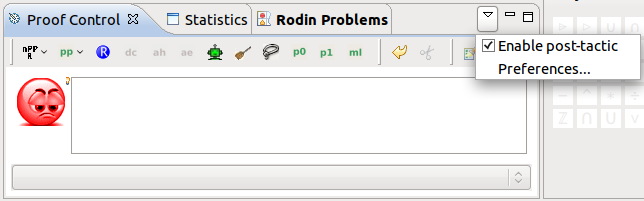
Let us analyze whether this is an inconsistency in the model. Switch to the Proving Perspective and double click on the proof obligation DLF/THM. In the Proof Control view, first disable the post-tactics (there is a small downward pointing arrow in the upper right hand corner above the toolbar, see Figure 2.22. Click on this arrow and make sure that the option Enable post-tactic is unchecked in the dropdown menu.) We turn off the post-tactics because we want to see the proof develop in its different stages. Then select the root node in the Prove Tree, right-click on it and select Purge. This removes any proof that might be already started by the auto-provers. By doing this we want to assure that we you have the same proof as in this tutorial.
In order to succeed with the proof, we need a pair  that is in but not in . Having a look the axioms, we find axm4 of doors_ctx1, which states that there is a location
  different from where everyone is allowed to go:
- AXIOMS


So for every person  in , and
  are in aut. (In words: every person is allowed to go both to the outside and to a location ). The basic idea of our proof is that a person is either outside and can to the location . When it is not outside, it can walk outside.
What we implicitly assumed was that there is actually a person, so we need to prove now is that is non-empty. This holds since carrier sets are always non-empty, but is a bit hard to prove. Now add the hypothesis  using the
![\includegraphics[height=2ex]{img/icons/rodin/ah_prover.png}](images/img-0308.png) button after entering the predicate into the Proof Control text area. In the Proof Tree view you can now see three new nodes that have to be proven:
button after entering the predicate into the Proof Control text area. In the Proof Tree view you can now see three new nodes that have to be proven:
 is the trivial well-definedness condition, just click on
![\includegraphics[height=2ex]{img/icons/rodin/auto_prover.png}](images/img-0341.png) to prove it.
to prove it.  is the hypothesis that we introduced, just click on
to prove it.
is the hypothesis that we introduced, just click on
to prove it.  is the original goal but we can use the introduced hypothesis in the proof. We now continue with the proof of this goal.
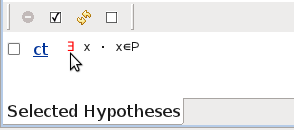
Click on the existential quantifier of the new hypothesis  (appearing in the Selected Hypothesis view) as demonstrated in Figure 2.23. You see that it is automatically instantiated. That means that we can use
  from now on in our proof as an example for a person and we have the new hypothesis
  .
.
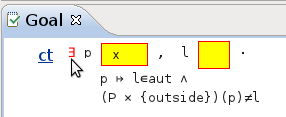
An existential quantification can be proven by giving an example for the variables. First, we instantiate in the goal with : enter in the yellow box corresponding to in the Goal View and click on the existential quantifier as shown in Figure 2.24.
 .
.The instantiation produces two new nodes in the Proof Tree view. The first goal is the trivial well-definedness condition and can be easily discharged by pressing
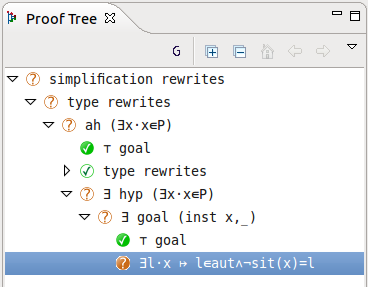
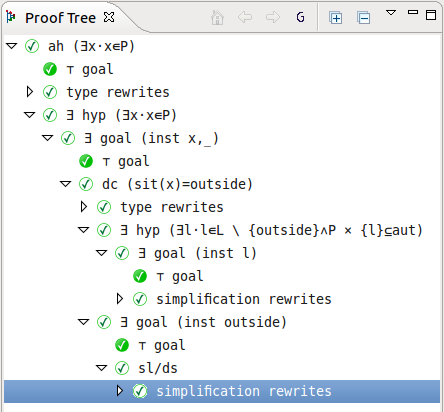
. The remaining goal is  which results from the old goal by replacing by . You can see the the current proof tree in Figure 2.25. In the node ah we added the hypothesis, in
  hyp we instantiated from a hypothesis and in goal we instantiated in the goal.
 with .
Now we need an example for the remaining variable . There are two situations we want to distinguish: The person could be outside or not. To do this, type  into the Proof Control view and click on the button
![\includegraphics[height=2ex]{img/icons/rodin/dc_prover.png}](images/img-0352.png) (dc for distinguish case). Again, you get three new goals.
(dc for distinguish case). Again, you get three new goals.
The first is the well-definedness condition of
. must be a function and in its domain. This is easy to prove since is a total function (3.3.5). Just press
. Then second node has the original goal but
as a hypothesis. The third node has the original goal but
 as a hypothesis.
Let’s continue with the case  : When is outside, it can always go to the of axm4. To search for axm4, type into the Proof Control text field and click the button
![\includegraphics[height=2ex]{img/icons/rodin/sh_prover.png}](images/img-0313.png) . Now click on the symbol in the axm4 (see Figure 2.26) to instantiate . Now we have as an example for a location which is not outside and where everybody can go.
. Now click on the symbol in the axm4 (see Figure 2.26) to instantiate . Now we have as an example for a location which is not outside and where everybody can go.
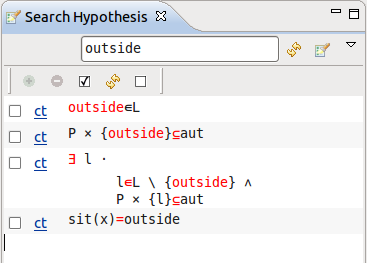 : The third one is axm4.
 Our goal still is  . Note that the existential quantification introduces a new which has not (yet) anything to do with our location where anybody can go. Now type into the yellow box of the goal and press the symbol to state that we use our as an example for the in the existential quantification. Again, we have first the trivial goal as well-definedness condition, just press
. The remaining goal should be . This can be proven by the already selected hypothesis ,
. Note that the existential quantification introduces a new which has not (yet) anything to do with our location where anybody can go. Now type into the yellow box of the goal and press the symbol to state that we use our as an example for the in the existential quantification. Again, we have first the trivial goal as well-definedness condition, just press
. The remaining goal should be . This can be proven by the already selected hypothesis ,  and
and  . Just press
.
. Just press
.
Now our second case of the case distinction remains where is not outside ( ). Then can just go outside. Again the goal is . Type as an example for a location into the yellow box and press the symbol. Press
to discharge the trivial well-definedness condition . The new goal should be
). Then can just go outside. Again the goal is . Type as an example for a location into the yellow box and press the symbol. Press
to discharge the trivial well-definedness condition . The new goal should be  .
.
To prove this we need the information that has the right to go . This is stated in the axiom  . Have a look at the Search Hypothesis view. There should be still the result from the last search for . (If not, repeat the search by entering into the Proof Control and press
). Select (in Figure 2.26, it’s the second entry) and press
. Have a look at the Search Hypothesis view. There should be still the result from the last search for . (If not, repeat the search by entering into the Proof Control and press
). Select (in Figure 2.26, it’s the second entry) and press
![\includegraphics[height=2ex]{img/icons/rodin/add.png}](images/img-0019.png) to add it to your selected hypothesis. Then the auto-prover has enough information, just click
and the last goal of our theorem should be proven.
to add it to your selected hypothesis. Then the auto-prover has enough information, just click
and the last goal of our theorem should be proven.
We just summarize the proof. Compare this with your final proof tree (like in Figure 2.27).
added hypotheses: |
well-definedness condition |
the hypotheses: automatically proven |
instantiation of |
using |
well-definedness condition |
case distinction |
well-definedness condition ( |
first case: instantiation of |
using |
well-definedness condition |
automatically proven |
second case: using |
well-definedness condition |
hypotheses |
automatically proven |
 in the goal
 in the goal
 selected
 : The third one is axm4.
 |
|
|
|
|
|