Rodin Handbook

This work is sponsored by the Deploy Project

This work is licensed under a Creative Commons Attribution 3.0 Unported License
 |
 |
 |
User Manual for Rodin v.2.3 |  |
 |
 |

2.9.1 The Celebrity Problem
In this section, we will work on the model of the so-called celebrity problem. We use a new model instead of the traffic light because it provides us with some proofs where manual interaction is necessary. In the setting for this problem, we have a “knows” relation between persons. This relation is defined so that
no one knows himself,
the celebrity knows nobody,
but everybody knows the celebrity.
The problem’s goal is to find the celebrity. We want to model an algorithm fulfills this task.
![\includegraphics[width=7mm]{img/warning_64.png}](images/img-0004.png)
Make sure that you have no existing Project named Celebrity. If you do, then rename it. To do so, right click the project and select Rename...
Import the archive file Celebrity.zip to you Event-B Explorer. To do this, select File  Import General Existing Projects into Workspace. Then select the according archive file and click on Finish.
Rodin takes a few seconds to extract and load all the files. Once it is done, it shows that there are a few problems with this project as you can see in the Rodin Problems View (compare with figure 2.16).
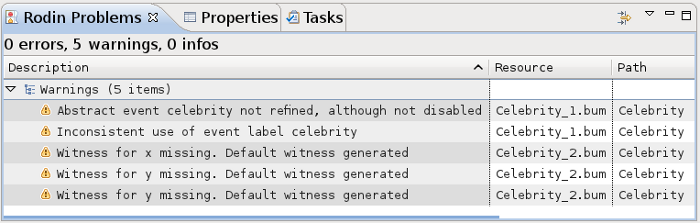
We will describe how the model is organized below in 2.9.3.
In the first part of this section, our goal is to fix these problems. Let’s take a look at the warning stating that the event label “celebrity” is misused (“Inconsistent use of event label celebrity”). Double-click on the warning to open the Celebrity_1 machine. Select the event celebrity. The problem is that the event is not declared as a refinement. To solve the problem, expand the event and add a new entry in the REFINES section (Click on the
![\includegraphics[height=2ex]{img/icons/rodin/add.png}](images/img-0019.png) button to create a new entry). This declares that the event is a refinement of an event with the same name in the abstract machine (3.2.3.1). As this is the case here, we can now save the project and the warning should disappear.
button to create a new entry). This declares that the event is a refinement of an event with the same name in the abstract machine (3.2.3.1). As this is the case here, we can now save the project and the warning should disappear.
The three remaining warnings state that witnesses (3.2.3.4.4) are missing. Double click on the warning to open the concrete model (here Celebrity_2). Then expand the celebrity event and add a witness in the WITH section (Click on the
button to create a new entry).
A default witness wit1 has been created, with a default value  (e.g. the predicate “true”) which we need to change. Its name will have to be x if we want it to be a witness for the parameter x of the corresponding abstract event in the machine Celebrity_1. The abstract event has the assignment
  , while the concrete one has the assignment
  . So the content of the witness is x = b. The event should now look as follows:
- Event
celebrity

- refines
celebrity
- when
- with
- then
- end


Edit the content and save the file. One warning will disappear, and only two will remain.
![\includegraphics[width=7mm]{img/info_64.png}](images/img-0003.png)
Try completing the other two witnesses on your own. A hint: Both witnesses are simple equalities, and both can be found by comparing the third guard of the abstract event with the second guard of the concrete one. Remember to give the witness the name of the variable it stands for. If you completed this step correctly, there should be no warning, info or error left in the Rodin Problems View (3.1.2.5).
The following Section 2.9.2 shows the final Celebrity_2 machine.
|
|
|
|
|
|