Rodin Handbook

This work is sponsored by the Deploy Project

This work is licensed under a Creative Commons Attribution 3.0 Unported License
 |
 |
 |
User Manual for Rodin v.2.3 |  |
 |
 |

2.8.3 The Actual Data Refinement
The easiest way to create a refinement is by right-clicking on the machine in the project browser and selecting Refine (in this case, we will be refining the machine mac from the project tutorial-3). This will create a “stub” consisting of all variables and events. Please use this method to create a machine with name mac1.
![\includegraphics[width=7mm]{img/warning_64.png}](images/img-0004.png)
In refinements, the Edit View of the Editor hides some information from the abstract machine by default. This can be particularly important when you modify a refined event. The Pretty Print View shows all the element with elements from the abstract machine in italics.
For this tutorial, make sure that you right-click on the machine and select refine from the drop-down menu. If you have created a machine the normal way and later edited the refines section, the tutorial will assume that you have events (e.g. sets_peds_go) and variables that you do not have.)
First we have to make the machine aware of the context by adding a sees (3.2.3.2) statement:
![\includegraphics[width=7mm]{img/pencil_64.png}](images/img-0005.png)
- MACHINE
mac1
- REFINES
mac
- SEES
ctx1
We will start with the traffic lights for the pedestrians. It has only two colours (red and green) and only one of them is shown at a time. We introduce a new variable called peds_colour to represent which of the lights is shown. The variable has a corresponding invariant and initialization (the changes are shown in the following code snippet). The extended keyword in the initialisation means that all actions from the refined initialisation are copied:
- VARIABLES
- INVARIANTS

- EVENTS
- Initialisation
extended
- begin

- end
- END


Next, we will create a gluing invariant (3.2.3.1) that associates peds_go from the abstract machine with the variable peds_colour that we just created. The gluing invariant will map TRUE to green and FALSE to red:
- INVARIANTS


In its current state, this gluing invariant can be violated: if the event set_peds_go is triggered, for instance, the variable peds_go will change but peds_colour will not. We expect that this will result in undischarged proof obligations (3.2.6). We can check this by expanding the machine in the Event-B Explorer. Indeed, we now see two undischarged proof obligations (compare with Figure 2.14).
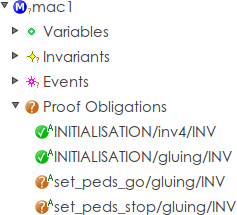
To fix this, we have to modify the two events in question. Let’s start with set_peds_go. First, we change the event from extended to not extended in the Editor as shown in figure 2.15.
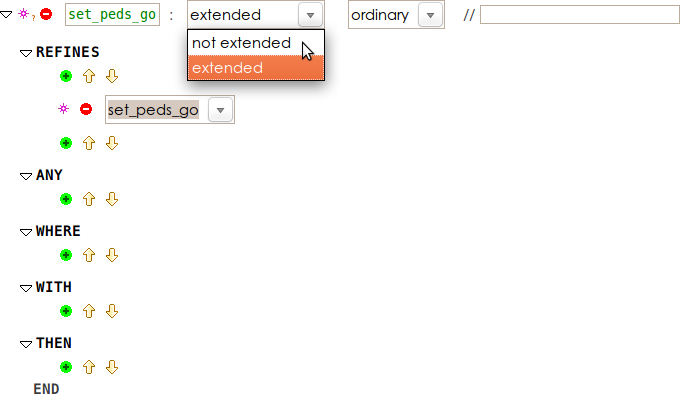
This change will copy the guard and action from the abstract machine, so that we can modify it. We can now replace the action with the corresponding action regarding peds_colour (replacing peds_go := true with peds_colour := green). While we are at it, we can also rename the name of the event to something more fitting (e.g. set_peds_green).
Next, we perform the corresponding change on set_peds_stop (change the action to peds_colour := red and rename the event set_peds_red). Lastly, the event set_cars also contains a reference to peds_go that must be replaced (in the second guard, replace peds_go = FALSE with peds_colour = red).
Once all references to peds_go have been replace, we can remove the variable peds_go from the VARIABLES section. You will also need to change the INITIALISATION event to not extended and remove the action which initialises the variable peds_go. Now you shouldn’t have any errors or warnings, and all proof obligations should be discharged.
If you get the error message “Identifier peds_go has not been declared”, then there are references to the refined variable left somewhere in the model. It can be helpful to use the Pretty Print view, as it will show the “inherited” elements from the abstract machine as well.
|
|
|
|
|
|